Tuesday, July 14, 2009

Perl modules of online MMORPG

What happened to MTG_Studio?
I was distraught to see that my favorite tool to manage a Magic: The Gathering card collection has been suspended (probably by Wizard of the Coast). Hopefully it is sadly temporary (that's what Beaker keeps telling me anyway) but I will not bet much on that. If anyone has news, please let me know.

That event prompted me to wonder if there was any module on CPAN dealing with MTG.
I was surprised not to find any, so I may just have to do something about that.

MMORPG love from Perl?
On the other hand, I found a few modules related to massively multi player role playing games.
  • World Of Warcraft
- Games::WoW::Armory - Access to the WoW Armory
- Bot::BasicBot::Pluggable::Module::WoWPVP - Fetch information about pvp grades for World Of Warcraft
- WWW::Wow::RealmStatus - The great new WWW::Wow::RealmStatus!
- WoW::Wiki - Perl extension to parse WoW wikki markup
  • Lord of the Rings Online
- There is no Perl module yet but a LOTRO Web API exists!
  • EverQuest
- Games::EverQuest::LogLineParser - Perl extension for parsing lines from the EverQuest log file.
- Other Perl scripts exist to complement the LogLineParser module
  • Eve Online
- Games::EveOnline::API - A simple Perl wrapper around the EveOnline XML API.
- WebService::EveOnline -- a wrapper intended to (eventually) provide a useful interface to the MMORPG game, "Eve Online"
  • Neverwinter Nights (not really an MMORPG)
- Games::NeverwinterNights::Query - Query Perl class to query a Neverwint Nights Server
  • F.E.A.R. (not really an MMORPG)
- Games::FEAR::Log - Log analysis tool for F.E.A.R. dedicated servers

Does anyone out there have written or used an online PC game-related module?

Perl modules of online MMORPG

What happened to MTG_Studio?
I was distraught to see that my favorite tool to manage a Magic: The Gathering card collection has been suspended (probably by Wizard of the Coast). Hopefully it is sadly temporary (that's what Beaker keeps telling me anyway) but I will not bet much on that. If anyone has news, please let me know.

That event prompted me to wonder if there was any module on CPAN dealing with MTG.
I was surprised not to find any, so I may just have to do something about that.

MMORPG love from Perl?
On the other hand, I found a few modules related to massively multi player role playing games.
  • World Of Warcraft
- Games::WoW::Armory - Access to the WoW Armory
- Bot::BasicBot::Pluggable::Module::WoWPVP - Fetch information about pvp grades for World Of Warcraft
- WWW::Wow::RealmStatus - The great new WWW::Wow::RealmStatus!
- WoW::Wiki - Perl extension to parse WoW wikki markup
  • Lord of the Rings Online
- There is no Perl module yet but a LOTRO Web API exists!
  • EverQuest
- Games::EverQuest::LogLineParser - Perl extension for parsing lines from the EverQuest log file.
- Other Perl scripts exist to complement the LogLineParser module
  • Eve Online
- Games::EveOnline::API - A simple Perl wrapper around the EveOnline XML API.
- WebService::EveOnline -- a wrapper intended to (eventually) provide a useful interface to the MMORPG game, "Eve Online"
  • Neverwinter Nights (not really an MMORPG)
- Games::NeverwinterNights::Query - Query Perl class to query a Neverwint Nights Server
  • F.E.A.R. (not really an MMORPG)
- Games::FEAR::Log - Log analysis tool for F.E.A.R. dedicated servers

Does anyone out there have written or used an online PC game-related module?

Wednesday, June 10, 2009

Adding a menu bar to the twitter GUI: part 5

Updating to the new Net::Twitter::Lite API
Marc Mims updated the API of his twitter's interface module for Perl.
There are two versions:

In order to use the Lite version (largely sufficient for my modest needs), only trivial changes are needed in the twit_GUI.pl script:
  • replace use Net::Twitter by use Net::Twitter::Lite (duh!)
  • replace calls to Net::Twitter->new() by calls to Net::Twitter::Lite->new()
This ensures that I am now using a module that is actively supported.

Adding a menu bar
A menu bar can only be added to a Frame. According to the wxPerl docs,

A frame is a window whose size and position can (usually) be changed by the user. It usually has thick borders and a title bar, and can optionally contain a menu bar, toolbar and status bar. A frame can contain any window that is not a frame or dialog.
So, let's replace the Dialog occurences with Frame in the script.
The MyApp modules becomes:

##############################################################################
#
package MyApp;
#
##############################################################################
use vars qw(@ISA);
@ISA=qw(Wx::App); # this tells Perl to look for unknown methods in the Wx::App module

use Wx qw(wxDefaultSize wxDefaultPosition);

sub OnInit {
my($this) = @_;
my $frame = MyFrame->new('Twit', wxDefaultPosition);
# set it as top window (so the app will automatically close when
# the last top window is closed)
$this->SetTopWindow($frame);
$frame->Show(1);
1;
}

package MyDialog becomes package MyFrame:
##############################################################################
#
package MyFrame;
#
##############################################################################
use vars qw(@ISA);

@ISA=qw(Wx::Frame);

use Wx::Event qw(EVT_BUTTON EVT_CLOSE EVT_TEXT EVT_TEXT_MAXLEN);
use Wx qw(:sizer
:statictext
wxDefaultPosition
wxDefaultSize
wxDefaultValidator
wxDEFAULT_DIALOG_STYLE
wxID_OK
wxOK
wxRESIZE_BORDER
wxTE_MULTILINE
);

use constant MAX_POST_LENGTH => 140;

sub new {
my $class = shift;
my $password_file;

# Main window
my $form_width = 480;
my $form_height = 195;
# Array of line numbers used on the dialog window
my @ylines = (0, 10, 20, 40, 80, 100);

my $this = $class->SUPER::new(
undef, # parent
-1, # id
$_[0], # title
$_[1], # position [x, y]
[$form_width, $form_height] # size [width, height]
);

# Display the Wx icon on the application window
$this->SetIcon(Wx::GetWxPerlIcon());

#--------------------------------------------------------------------------
# Menu Bar
#--------------------------------------------------------------------------
my $file_menu = Wx::Menu->new('');
my $menu_bar = Wx::MenuBar->new();
$menu_bar->Append($file_menu, '&File');
$this->SetMenuBar($menu_bar);
...
Increase the form height by 10 pixels (up to 195) to make room for the menu bar.
And... voilĂ !

First version of twit script using wxperlEr... not too pretty, let's go back to the doc. Oh wait, what is that about panels?
A panel is a window on which controls are placed. It is usually placed within a frame. It contains minimal extra functionality over and above its parent class wxWindow; its main purpose is to be similar in appearance and functionality to a dialog, but with the flexibility of having any window as a parent.
Ah ah! The trick is to place a wxPanel object inside the frame and then relate every existing GUI element to this panel as the parent window. Previously, all the elements (button, text dialog, etc.) had the wxFrame as a parent window, hence the dark grey background. Just add this line before the Menu Bar code:
    # Create a panel where to place GUI elements
my $panel = Wx::Panel->new($this, -1);
and replace the $this argument by $panel everywhere you need to set the parent ID.

Now we've got a menu bar element. You can fill it by appending menu elements to it as is shown in the code below. Each menu element can be appended in turn with menu options. The wxFrame::SetMenuBar() method displays a given menu bar.
    #--------------------------------------------------------------------------
# Menu Bar
#--------------------------------------------------------------------------
my $menu_bar = Wx::MenuBar->new();

my $file_menu = Wx::Menu->new();
$file_menu->Append(11, 'E&xit');
$menu_bar->Append($file_menu, '&File');

my $help_menu = Wx::Menu->new();
$help_menu->Append(21, '&About');
$menu_bar->Append($help_menu, '&Help');

# wxFrame method to show a given menu bar
$this->SetMenuBar($menu_bar);
The & in the string (eg: 'E&xit') shows what shortcut will be used in combination with the Alt key (eg: Alt + x for 'E&xit').
To link an event with a menu selection, use the EVT_MENU event:
    EVT_MENU($this, 11, \&OnQuit);
EVT_MENU($this, 21, \&OnAbout)
The callback methods can be implemented as such:
sub OnQuit {
my $this = shift;
$this->Close( 1 );
}

sub OnAbout {
my $this = shift;
use Wx qw(wxOK wxCENTRE);
Wx::MessageBox("twit_GUI $VERSION\n$version_date\n(c)DamienLearnsPerl", # text
"About", # title bar
wxOK|wxCENTRE, # buttons to display on form
$this # parent
);
}
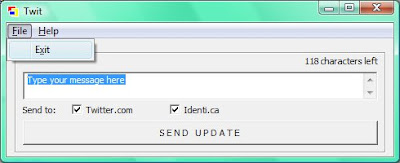
End result under Vista? Tadaaa!
Improvement layout using panelsNext step:
- Load/save password files

Find the whole new source code here.

Adding a menu bar to the twitter GUI: part 5

Updating to the new Net::Twitter::Lite API
Marc Mims updated the API of his twitter's interface module for Perl.
There are two versions:

In order to use the Lite version (largely sufficient for my modest needs), only trivial changes are needed in the twit_GUI.pl script:
  • replace use Net::Twitter by use Net::Twitter::Lite (duh!)
  • replace calls to Net::Twitter->new() by calls to Net::Twitter::Lite->new()
This ensures that I am now using a module that is actively supported.

Adding a menu bar
A menu bar can only be added to a Frame. According to the wxPerl docs,

A frame is a window whose size and position can (usually) be changed by the user. It usually has thick borders and a title bar, and can optionally contain a menu bar, toolbar and status bar. A frame can contain any window that is not a frame or dialog.
So, let's replace the Dialog occurences with Frame in the script.
The MyApp modules becomes:

##############################################################################
#
package MyApp;
#
##############################################################################
use vars qw(@ISA);
@ISA=qw(Wx::App);   # this tells Perl to look for unknown methods in the Wx::App module

use Wx qw(wxDefaultSize wxDefaultPosition);

sub OnInit {
    my($this) = @_;
    my $frame = MyFrame->new('Twit', wxDefaultPosition);
    # set it as top window (so the app will automatically close when 
    # the last top window is closed)
    $this->SetTopWindow($frame);
    $frame->Show(1);
    1;
}

package MyDialog becomes package MyFrame:
##############################################################################
#
package MyFrame;
#
##############################################################################
use vars qw(@ISA);

@ISA=qw(Wx::Frame);

use Wx::Event qw(EVT_BUTTON EVT_CLOSE EVT_TEXT EVT_TEXT_MAXLEN);
use Wx qw(:sizer
          :statictext
          wxDefaultPosition
          wxDefaultSize
          wxDefaultValidator
          wxDEFAULT_DIALOG_STYLE
          wxID_OK
          wxOK
          wxRESIZE_BORDER
          wxTE_MULTILINE
          );

use constant MAX_POST_LENGTH => 140;

sub new {
    my $class = shift;
    my $password_file;

    # Main window
    my $form_width  = 480;
    my $form_height = 195;
    # Array of line numbers used on the dialog window
    my @ylines = (0, 10, 20, 40, 80, 100);

    my $this = $class->SUPER::new(
                            undef,  # parent
                            -1,     # id
                            $_[0],  # title
                            $_[1],  # position [x, y]
                           [$form_width, $form_height] # size [width, height]
                           );

    # Display the Wx icon on the application window
    $this->SetIcon(Wx::GetWxPerlIcon());

    #--------------------------------------------------------------------------
    # Menu Bar
    #--------------------------------------------------------------------------     
    my $file_menu = Wx::Menu->new('');
    my $menu_bar = Wx::MenuBar->new();
    $menu_bar->Append($file_menu, '&File');
    $this->SetMenuBar($menu_bar);
    ...
Increase the form height by 10 pixels (up to 195) to make room for the menu bar.
And... voilĂ !

First version of twit script using wxperlEr... not too pretty, let's go back to the doc. Oh wait, what is that about panels?
A panel is a window on which controls are placed. It is usually placed within a frame. It contains minimal extra functionality over and above its parent class wxWindow; its main purpose is to be similar in appearance and functionality to a dialog, but with the flexibility of having any window as a parent.
Ah ah! The trick is to place a wxPanel object inside the frame and then relate every existing GUI element to this panel as the parent window. Previously, all the elements (button, text dialog, etc.) had the wxFrame as a parent window, hence the dark grey background. Just add this line before the Menu Bar code:
    # Create a panel where to place GUI elements
    my $panel = Wx::Panel->new($this, -1);
and replace the $this argument by $panel everywhere you need to set the parent ID.

Now we've got a menu bar element. You can fill it by appending menu elements to it as is shown in the code below. Each menu element can be appended in turn with menu options. The wxFrame::SetMenuBar() method displays a given menu bar.
    #--------------------------------------------------------------------------
    # Menu Bar
    #-------------------------------------------------------------------------- 
    my $menu_bar = Wx::MenuBar->new();

    my $file_menu = Wx::Menu->new(); 
    $file_menu->Append(11, 'E&xit');
    $menu_bar->Append($file_menu, '&File');
 
    my $help_menu = Wx::Menu->new();
    $help_menu->Append(21, '&About');
    $menu_bar->Append($help_menu, '&Help');

    # wxFrame method to show a given menu bar
    $this->SetMenuBar($menu_bar);
The & in the string (eg: 'E&xit') shows what shortcut will be used in combination with the Alt key (eg: Alt + x for 'E&xit').
To link an event with a menu selection, use the EVT_MENU event:
    EVT_MENU($this, 11, \&OnQuit);
    EVT_MENU($this, 21, \&OnAbout)
The callback methods can be implemented as such:
sub OnQuit {
    my $this = shift;
    $this->Close( 1 );
}

sub OnAbout {
    my $this = shift;
    use Wx qw(wxOK wxCENTRE);
    Wx::MessageBox("twit_GUI $VERSION\n$version_date\n(c)DamienLearnsPerl",  # text
                   "About",                   # title bar
                   wxOK|wxCENTRE,             # buttons to display on form
                   $this                      # parent
                   );          
}
End result under Vista? Tadaaa!

Improvement layout using panelsNext step:
- Load/save password files

Find the whole new source code here.

Monday, June 1, 2009

Perl Iron Man

Ok, I've failed in the Perl Iron Man contest: it has been more than 10 days since last post :(
But after the first thrills due to the project's novelty, there are not a lot of incentives coming from the Perl Iron Man organization (unless I've somehow missed it?):
I was expecting leaderboards, post of the month, constructive critiques of blogs by writing professional, cheering pom pom girls, etc.
I'm feeling a little bit let down right now...